20% Larger, Order for Order
Sunset Boulevard, Denmark's leading Danish-owned fast food chain, moved from 2% of orders placed digitally to almost 80%. It also compared basket sizes. As reported in the case, digital orders are about 20% larger per transaction than orders taken manually at the counter.
Sunset is not alone in seeing this. Sprinting Retail's post on digital food ordering cites Taco Bell, which reported a 20% higher order value in its app. That is Taco Bell's figure, not a FoodShop result.
A larger basket does not happen on its own. The same post says a web shop must offer “the right upsales at the right point of time in the ordering process”. The live Sunset shop does it at three moments. Here they are, as a guest sees them, ordering one Hereford Bearnaise menu.
Moment 1: Inside the Product
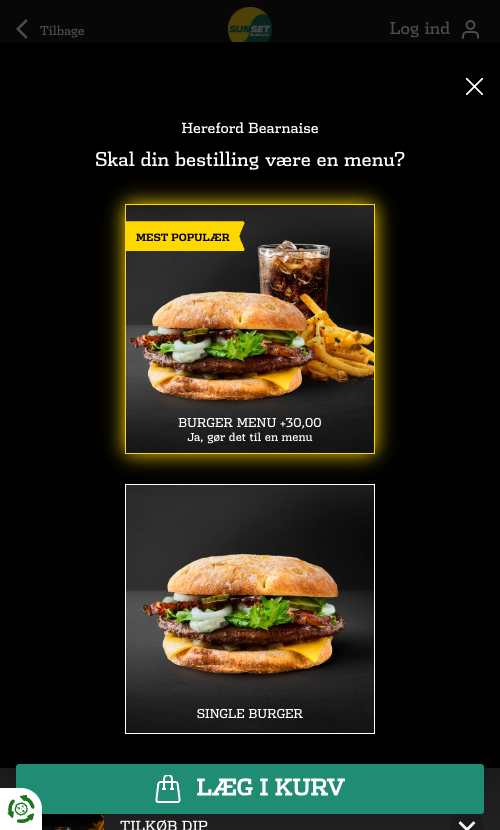
The first offer comes before the burger is in the basket. Choose a single burger and the shop asks whether it should be a menu: “Burger menu +30,00”, marked as the most popular choice.
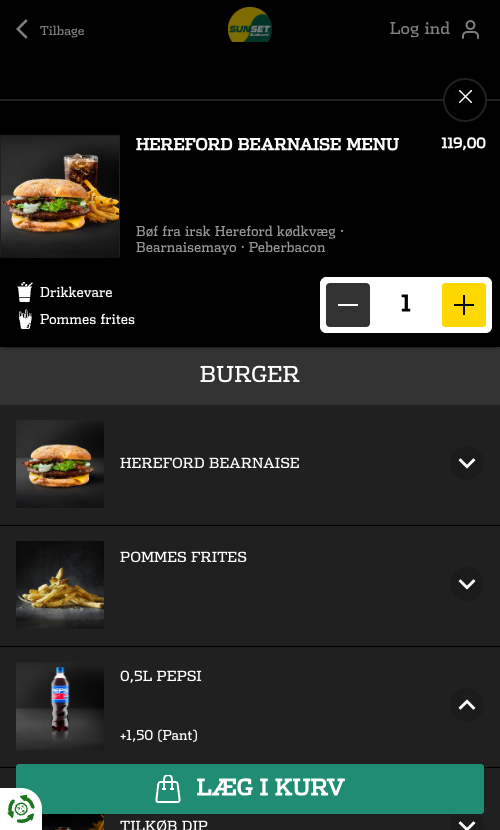
Open the menu and each component can be swapped. The 0.5 l Pepsi can become a milkshake for +30 kr. Dips can be added. Sides sit under the burger with their prices: Chocolate Sundae +26, 3 Chili Cheese Bites +15, 3 Crispy Chicken Tenders +39, 6 Chicken Nuggets +44.
Moment 2: A Step Just for Add-ons
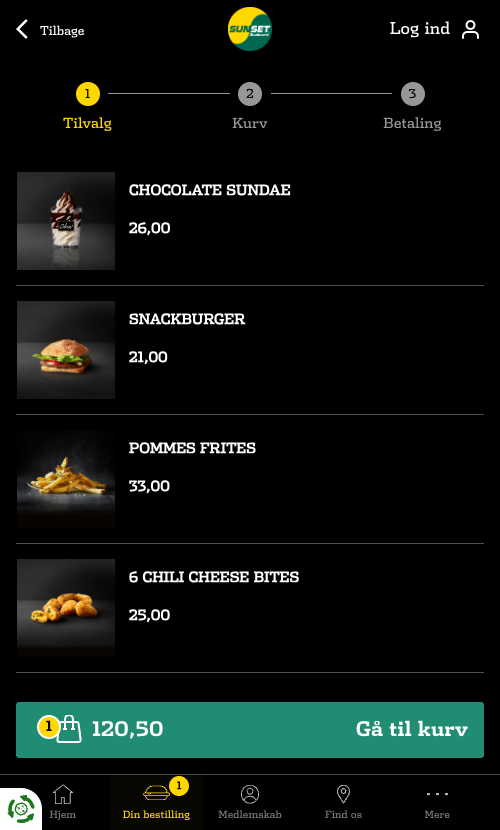
When the guest goes to checkout, the first step is not the basket. It is “Tilvalg”, add-ons: a short list of suggestions with photos and prices. Chocolate Sundae 26, Snackburger 21, Pommes frites 33, 6 Chili Cheese Bites 25. The running total stays in a bar at the bottom, so the guest sees exactly what each yes costs.
Checkout has three steps: add-ons, basket, payment. The upsell step is the first of them. A guest who wants nothing more goes straight on with “Gå til kurv”, go to basket.
Moment 3: The Nudge in the Basket
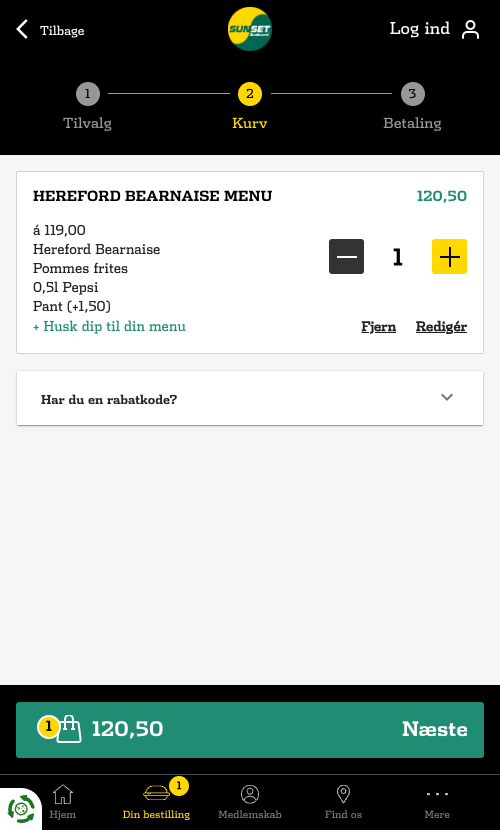
The basket lists the menu with its parts: burger, fries, drink and the bottle deposit as its own line. Under it is one small link: “+ Husk dip til din menu”, remember a dip for your menu. It is the last offer before payment, and it is about the item already in the basket.
The basket also keeps the menu editable. “Redigér” reopens the meal builder, so a guest who wants to upgrade the drink after all can do it without starting over.
Why the Screen Sells More
Sprinting Retail's post gives one reason directly: larger purchases happen at the kiosk because “some people do not like to be upsold by a person”. On a screen, every offer comes with a picture and a price, and the guest can say no without saying anything.
The offers are also not fixed. On FastFoodShop, upsell suggestions are set by rules: per restaurant, per weekday, per date, and they apply in the product, in the catalogue and in the basket. A chain can, for example, suggest a limited-edition shake for one week only, without changing the shop.
The full Sunset story, including the 2% to almost 80% shift, is in the Sunset Boulevard case study. How the kiosk fits in is in What Happens When a Fast Food Chain Puts Kiosks In.
A Checklist for Your Own Shop
- Offer the menu upgrade before a single item reaches the basket.
- Make every component swappable, with the surcharge shown on the option.
- Add a short add-on step at the start of checkout, with prices and a visible total.
- Suggest one add-on in the basket that fits what is already there.
- Keep configured items editable from the basket.
- Set suggestions per restaurant and per day, and change them when the menu changes.
The 20% figure and other facts about Sunset Boulevard are from the published Sunset Boulevard customer story by Sprinting Retail, the company that develops FoodShop, and refer to the period the case describes. The shop screens and prices were read from the live Sunset Boulevard shop in October 2026. The Taco Bell figure and the quotes on upsell are from Sprinting Retail's post How to Fuel Food Sales with a Powerful Digital Food Ordering System; Taco Bell's figure belongs to Taco Bell, not to FoodShop.